








Many companies run into the same problem: sales works in HubSpot, operations and finance work in Priority, and the handoff between the two is too manual. Teams end up re-entering the same data, checking multiple systems to confirm what is true, and losing trust in their reporting. A well-designed integration solves that by creating a more connected process from lead to customer to operational execution. Priority’s own documentation positions its API and integration tooling as a way to expose and exchange ERP data with external systems, while HubSpot’s CRM platform is built to create, retrieve, and manage structured business records and relationships through APIs.
If your company uses HubSpot to manage marketing, sales, and customer relationships, and Priority ERP to manage operations, finance, inventory, and fulfillment, integration is not just a technical upgrade. In many organizations, it is the difference between a clean, scalable operating model and constant internal friction. Priority provides official integration capabilities through its REST/OData API and SDK, while HubSpot provides CRM object APIs, associations, and custom objects for more advanced CRM-side modeling.
What a HubSpot–Priority integration actually means
At a practical level, a HubSpot–Priority integration means deciding how data should move between the CRM and the ERP, when it should move, and which system should own it. In most organizations, HubSpot owns lead management, sales activity, pipeline progression, and much of the customer-facing engagement, while Priority owns core ERP records such as orders, invoicing, inventory, and operational execution. Priority’s REST/OData guide explicitly documents how forms can be exposed via API and how access is controlled, while HubSpot’s APIs support record creation, retrieval, and associations across CRM objects.
A strong integration is not just “field sync.” It creates a reliable business flow. A lead may start in HubSpot, turn into a qualified opportunity, become a customer, trigger downstream ERP actions, and then send key updates back into HubSpot so revenue teams stay informed. HubSpot’s docs specifically support associating records and managing custom objects, which makes it possible to represent more complex CRM-to-ERP relationships when the standard contact-company-deal model is not enough.
Why businesses integrate HubSpot with Priority
The most common driver is operational clarity. Without integration, customer-facing teams and back-office teams work from partial views. That creates slower response times, unnecessary manual work, and weak handoffs between sales, finance, and operations. With the right integration in place, sales can see relevant ERP context, finance can rely on cleaner source data, and leadership can trust reporting more confidently. Priority’s API guide and Zapier guide both reflect that the platform is designed to expose specific forms and move data into and out of Priority under defined permissions and workflows.
There is also a strong growth case. When ERP data reaches HubSpot in a structured way, companies can build smarter segmentation, lifecycle automation, upsell motions, and more informed account management based on real purchasing or operational data, not just form submissions and email opens. HubSpot’s custom object records API explicitly states that custom objects allow organizations to represent and organize data based on unique business requirements.
What each system should own
One of the highest-value decisions in the project is defining ownership clearly from the start.
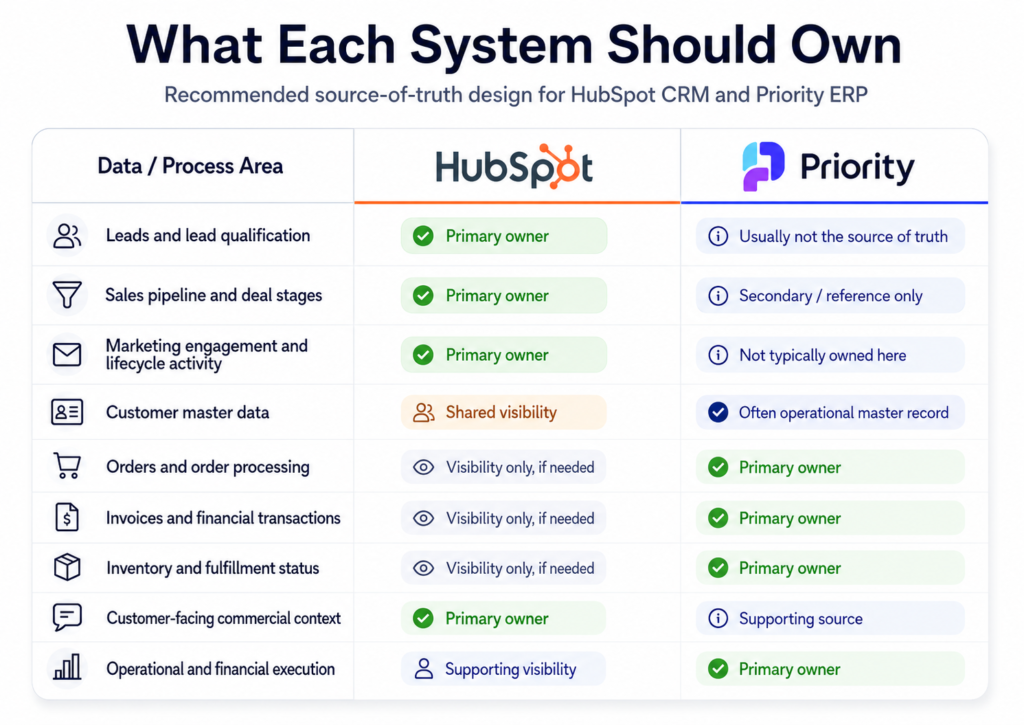
This is not a technical footnote. It is the foundation of a successful integration. Many failures are caused less by bad code and more by weak ownership design. If both systems can overwrite the same fields without clear governance, mistrust appears fast.
Common use cases
- Push closed-won deals from HubSpot to Priority
When a deal is marked as Closed Won in HubSpot, the integration can automatically create the relevant customer, order, or sales record in Priority, so finance, operations, delivery, or logistics can begin their process without manual data entry. - Bring ERP data back into HubSpot
Sync information such as order status, invoice status, delivery milestones, product history, purchase history, or customer balance into HubSpot, giving sales, account management, and customer success teams better visibility. - Quote-to-order handoff
When a HubSpot quote is accepted, the integration can automatically create a draft order or sales order in Priority, reducing mistakes and eliminating manual re-entry between sales and operations. - Automated renewal and upsell triggers
When a customer’s order history, purchase volume, or subscription data in Priority reaches a certain threshold, HubSpot can automatically trigger a workflow, task, or sequence for renewal, upsell, or account management outreach. - Customer onboarding workflow triggers
When Priority confirms that an order has been fulfilled, shipped, delivered, or reached a specific operational milestone, HubSpot can trigger onboarding emails, check-ins, internal CS tasks, or service workflows. - Sync companies, contacts, products, subscriptions, and custom objects
Keep key business entities aligned between HubSpot and Priority, including customers, contacts, product catalogs, quotes, invoices, subscriptions, and custom business records. - Expose Priority data inside HubSpot
Display ERP-side information inside HubSpot records so sales and CS teams can see open orders, invoice status, delivery progress, and purchase history without logging into Priority. - Use Priority data for HubSpot reporting and automation
Build lists, reports, dashboards, and workflows based on real ERP data, such as actual revenue, purchase frequency, inactive accounts, delivery status, or high-value customers.
Common data flows between HubSpot and Priority
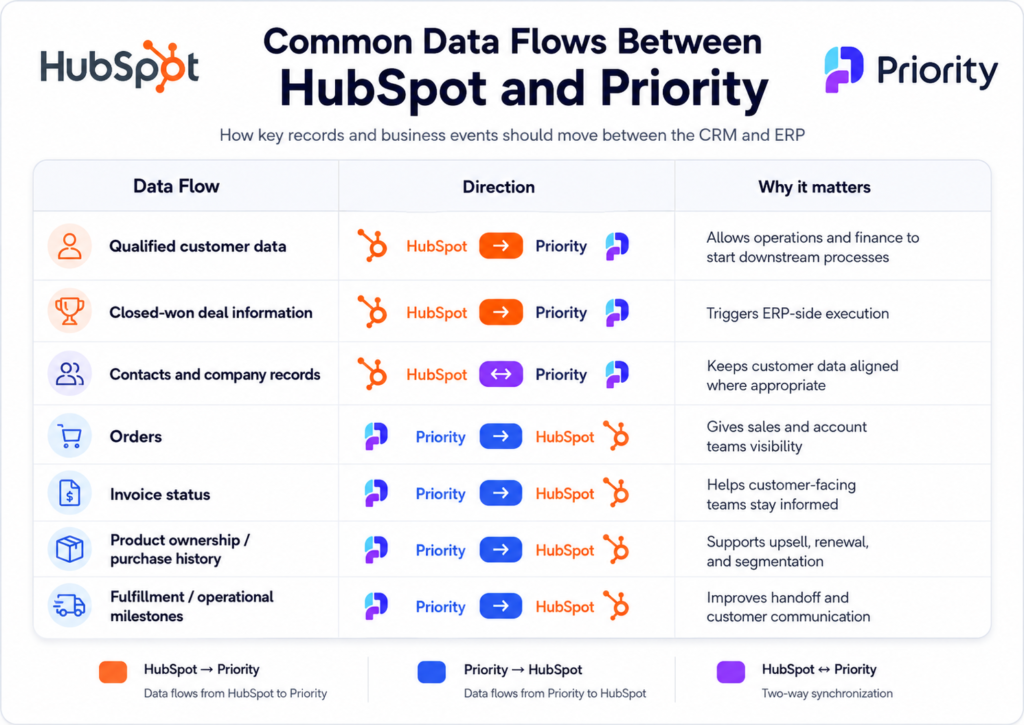
The right answer depends on the business process, not only on what the API technically allows. High-value integrations are selective. They bring the right data into the right system for the right reason.
A simple flow diagram:
Lead in HubSpot → Deal in HubSpot → Closed Won → Customer / Order in Priority → Status updates back to HubSpot
The most important principle: define the source of truth
Before any development starts, define system ownership clearly. That means deciding which system creates a record first, which system is allowed to update it, which fields are authoritative in each platform, and which records should only be exposed for visibility rather than edited in both places.
Priority’s REST API guide documents that API access is permission-based, token-based authentication is supported, and specific forms must be explicitly marked as available for API access. That is a strong reminder that integration architecture should be deliberate, not broad by default.
HubSpot’s associations API is equally important here. It allows you to create, manage, and remove associations between CRM records, including labeled associations, which helps model relationships cleanly across entities.
Integration options: lightweight sync vs. custom API
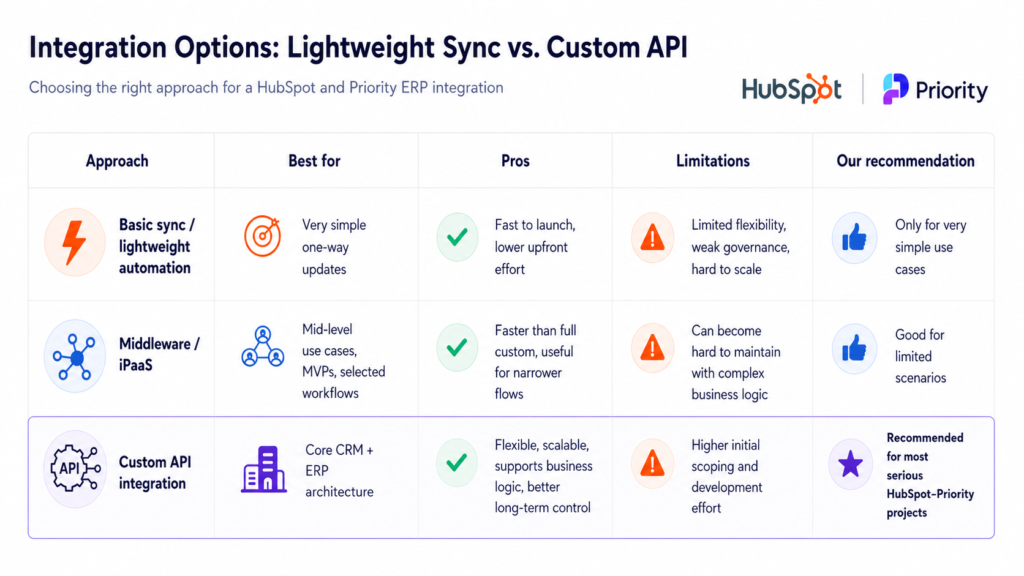
Some companies start by asking whether they can build the integration with middleware or no-code tools. In some narrow scenarios, yes. Priority has official documentation for working via Zapier, including prerequisites such as API access, multi-step Zaps, and webhooks support for certain export scenarios.
But in most serious business environments, a HubSpot–Priority integration is not just a simple automation. It usually involves business rules, field transformation, validation logic, update conditions, error handling, duplicate prevention, and clear control over sync direction. That is where a custom API integration becomes the better long-term solution.
Why we recommend a custom API integration
From our professional perspective, custom API development is the right approach for most companies that depend on both HubSpot and Priority as core business systems.
The reason is simple: real ERP–CRM integrations are rarely just field mapping projects. They are business architecture projects. They need to reflect how your organization actually sells, fulfills, bills, serves, and reports.
A custom API approach gives you stronger control over:
- data ownership
- sync direction
- timing and triggers
- transformation rules
- exception handling
- scalability
- logging and monitoring
- future changes
Priority’s documentation makes clear that its API is structured around explicit access, exposed forms, and a discoverable service model, while HubSpot’s APIs support standard objects, custom objects, and associations. Together, that makes a custom integration architecture both feasible and, in many cases, the most robust option.
Best practices for a successful HubSpot–Priority integration
1. Map the business process before touching the API
Do not begin with endpoints or field lists. Start with the workflow. Understand how a lead becomes a customer, when operational ownership begins, what should happen at closed-won, and what downstream processes need to be triggered.
2. Define data ownership early
Be explicit about which system owns which records and fields. This reduces sync conflicts, duplicate records, and reporting confusion later.
3. Do not sync everything
One of the most common mistakes is trying to mirror the entire ERP inside the CRM or vice versa. That usually creates more noise than value. Sync what teams truly need for execution, visibility, and reporting.
4. Use unique identifiers consistently
Reliable integration depends on matching records correctly across systems. If the ID strategy is weak, duplicates and broken relationships become much harder to prevent later.
5. Design for errors, not only for success
Every integration should include logging, validation, failure handling, and retry logic. The question is not whether errors will happen, but whether your team can detect and resolve them quickly.
6. Build with future changes in mind
Business processes evolve. Product structures change. Reporting needs grow. A custom API architecture is usually easier to extend and maintain than a patchwork of lightweight automations.
7. Use HubSpot custom objects only when they create real value
HubSpot’s custom object records API says custom objects are meant to represent and organize data based on unique business requirements. That makes them useful when you need to model ERP-related entities that do not fit cleanly into standard CRM objects.
Common mistakes to avoid
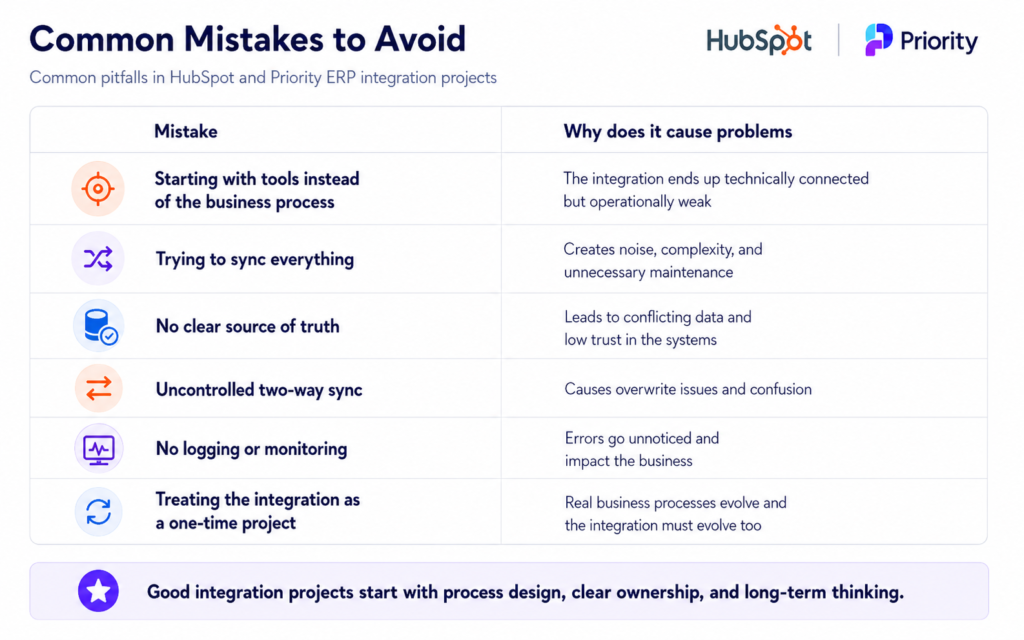
The first mistake is treating the project as a technical sync only. It is not. It is a process design and systems architecture project. The second is choosing the tool before defining the use case. Just because a platform can connect two systems does not mean it can support your business logic well.
How to know your business is ready for HubSpot and Priority ERP Integration
You are likely ready for a proper integration project if:
- HubSpot and Priority are both core systems in your operation
- sales and operations depend on each other’s data
- teams are re-entering the same information manually
- reporting is inconsistent across departments
- your current process breaks after closed-won
- you need more visibility into post-sale execution
- leadership wants cleaner data and better forecasting
If that sounds familiar, the next step should not be jumping straight into development. It should be scoping the process, mapping the logic, and deciding what the integration should actually achieve.
Our recommendation
If you are serious about connecting HubSpot and Priority in a way that supports the business long term, our recommendation is clear:
Approach it as a custom integration architecture project, not as a quick connector setup.
That means starting with:
- business process mapping
- source-of-truth design
- object and field mapping
- sync rules
- exception handling
- reporting requirements
- and only then moving into API development
That approach is usually more professional, more scalable, and more cost-effective than trying to patch together a fragile solution that will need to be rebuilt later.
Final thoughts
A well-built HubSpot–Priority integration does far more than move records from one system to another. It creates alignment between sales, marketing, operations, and finance. It reduces manual work, improves data quality, supports better reporting, and gives teams the visibility they need to operate with confidence.
The companies that get the most value from this project are usually the ones that resist the urge to rush. They take the time to define the business logic first, then build the integration properly.
Thinking about integrating HubSpot with Priority ERP?
At SAGE Marketing, we help companies design and implement smart HubSpot integrations that connect business processes, data, and teams.
If you’re considering a HubSpot <> Priority ERP integration, we can help you define the right architecture, map the business logic, and design a custom API integration tailored to your environment.
Our goal is to make sure the integration does more than simply connect two systems. It should support your sales, finance, and operations teams, improve data flow, and scale with your long-term growth.
FAQ
What is a HubSpot and Priority ERP integration?
A HubSpot and Priority ERP integration connects HubSpot’s CRM, marketing, sales, and service data with Priority’s ERP system. The goal is to allow important business data and events to move between both systems in a structured, reliable way. This can include customers, companies, contacts, deals, quotes, orders, invoices, delivery status, product data, and operational updates.
Can Priority integrate with external systems through APIs?
Yes. Priority supports integration with external systems through official API capabilities, including REST/OData API and SDK options. These APIs allow external platforms, such as HubSpot, to read, create, update, or sync relevant ERP data. Priority’s API documentation also explains important prerequisites such as API licensing, token-based authentication, form exposure, permissions, and access configuration.
Can HubSpot support complex ERP-related data models?
Yes. HubSpot can support more advanced ERP-related data models using standard CRM objects, associations, properties, and custom objects. For example, companies, contacts, deals, tickets, and products can cover many business needs. When the ERP structure includes unique entities or relationships, HubSpot custom objects can help represent data that does not naturally fit into the standard CRM model.
Is Zapier enough for a HubSpot–Priority integration?
Zapier can sometimes be enough for narrow, simple, and low-risk use cases, such as sending basic form submissions or triggering a simple data update. Priority also documents Zapier-based connectivity for certain scenarios. However, for serious ERP-CRM integrations involving business logic, validations, ownership rules, error handling, or long-term scalability, a custom API integration is usually the stronger option.
Why do you recommend custom API development?
A custom API integration gives the business much more control over how HubSpot and Priority communicate. Most real-world integrations require data transformation, validation rules, ownership logic, duplicate handling, field mapping, monitoring, retries, and clear error management. These requirements usually go beyond what lightweight connectors can handle well, especially when the integration affects sales, finance, operations, or customer-facing processes.
Do we need HubSpot custom objects?
Not always. In many cases, HubSpot’s standard objects are enough, especially if the integration focuses on companies, contacts, deals, products, quotes, or tickets. However, if Priority includes ERP entities that do not fit HubSpot’s standard structure, such as subscriptions, assets, orders, service agreements, or project records, custom objects can be a strong way to model that data properly.
What is the biggest risk in this kind of project?
The biggest risk is starting development before the business process is clearly defined. If the team does not first agree on data ownership, field mapping, system logic, reporting needs, sync direction, permissions, and edge cases, the integration can become unstable or difficult to maintain. A technical connection alone is not enough; the business architecture must be clear first.
What is the right first step?
The right first step is a proper scoping and architecture phase. Before writing code or connecting systems, the business should define the process, data model, ownership rules, sync logic, reporting needs, and integration goals. This helps ensure the final integration is not just technically functional, but also supports sales, finance, operations, customer success, and long-term growth.