








The definitive, no-fluff blueprint for B2B SaaS teams to track ARR, automate renewal pipelines, handle expansions, and stop churn, using HubSpot’s native tools correctly.
Why This Matters
Most SaaS companies lose revenue not because they have a bad product, but because their renewal process is reactive, manual, and fragmented across spreadsheets and Slack messages. Studies consistently show SaaS startups can see churn rates as high as 60%, and acquiring a new customer costs 5–25× more than retaining an existing one.
HubSpot’s Revenue Analytics framework gives you the infrastructure to change that, but only if you set it up correctly from the start. This guide covers everything from the four native recurring revenue properties to a multi-deal expansion model, based entirely on official HubSpot Knowledge Base documentation and battle-tested patterns from the HubSpot community.
HubSpot’s Recurring Revenue Framework
HubSpot’s native approach to SaaS revenue tracking centres on the Revenue Analytics report, found at:
Reporting → Reports → Sales → Forecast & Revenue → Revenue
Before you can use it, you need to activate four special deal properties that HubSpot auto-generates on demand. This is a one-time setup step, once created, these properties cannot be removed.
Subscription note: The Revenue Analytics tool and recurring revenue deal properties require Sales Hub Enterprise or Service Hub Enterprise. They are not available on lower tiers.
How to activate the properties
- In your HubSpot account, navigate to Reporting → Reports
- In the left sidebar, select Sales
- Navigate to Forecast & Revenue, then select the Revenue report
- Click “Add properties and start tracking”
- In the dialog box, click “Create properties”
If the button is greyed out or missing, the properties already exist. Search for “recurring revenue” in your deal properties manager to confirm.
Once set up, the Revenue Analytics report shows your new, existing, and lost recurring revenue month by month. Here’s how it looks:

Source: HubSpot Knowledge Base — Track recurring revenue in HubSpot
The Four Core Deal Properties
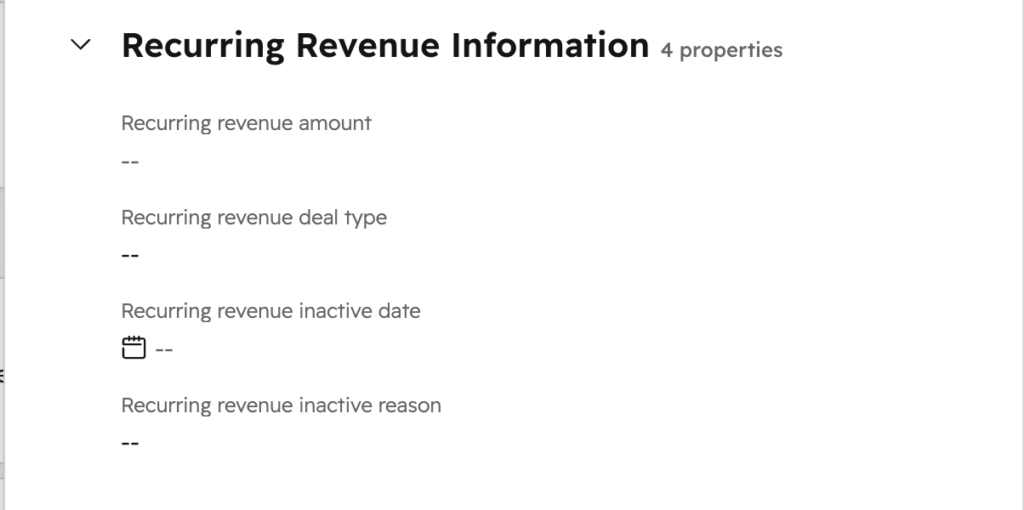
Once activated, HubSpot creates these four properties on all deal records. Understanding them is non-negotiable, get one wrong and your Revenue Analytics report will show inaccurate data.
Property 1: Recurring revenue amount
The total monthly recurring revenue for this deal. Always enter this as a monthly figure, even for annual contracts. For a $100K/year contract, enter $8,333.
Property 2: Recurring revenue deal type
Classifies the motion of this deal. Set this when the deal is created, it determines which column it appears in across your revenue report. Available values:
- New Business: a net-new logo
- Renewal: same contract renewed
- Upgrade: expansion of an existing contract
- Downgrade: contraction of an existing contract
Property 3: Recurring revenue inactive date
The date when this deal’s recurring revenue stops being collected. Set this to the contract end date before creating the renewal deal.
Property 4: Recurring revenue inactive reason
Why the revenue stopped. This closes the loop on the original deal and is critical for accurate churn reporting. Available values: Churned, Renewal, Upgrade, Downgrade.
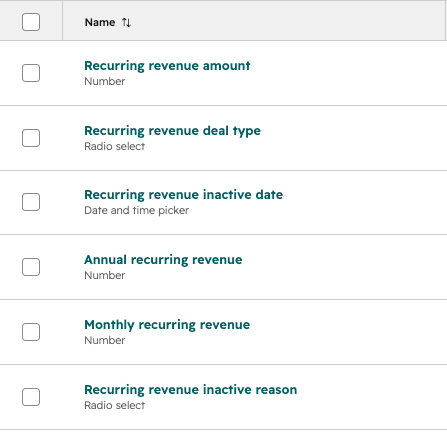
Property 5: Monthly Recurring Revenue (MRR)
The monthly recurring revenue of this deal. HubSpot calculates this automatically based on the recurring revenue amount and related recurring revenue fields, so it should usually be used for reporting rather than manually edited.
Property 6: Annual Recurring Revenue (ARR)
The annual recurring revenue of this deal. HubSpot calculates this automatically from the deal’s recurring revenue data, giving you the annualized value of the deal for ARR reporting.
How to fill in these properties, the correct patterns by event type
New business: Set RR deal type = New Business and fill in RR amount. Leave the inactive fields empty. The deal’s Close Date becomes the revenue start date in reports.
Renewal: On the expiring deal, set RR inactive date = contract end and RR inactive reason = Renewal. Then create a brand-new deal with RR deal type = Renewal and the updated amount. Never recycle the old deal record.
Churn: On the churned deal, set RR inactive date = last billing date and RR inactive reason = Churned. No new deal needed.
Upgrade/Downgrade: Close the old deal with inactive date + inactive reason = Upgrade or Downgrade. Then create a new deal with the full new contract value (not the delta) and deal type set to Upgrade or Downgrade.
Critical: The Revenue Analytics report only includes deals in the Closed Won stage. A deal’s Close Date is the revenue start date. Set it to the actual contract start date, not the date you internally marked the deal as won.
SAGE expert tips:
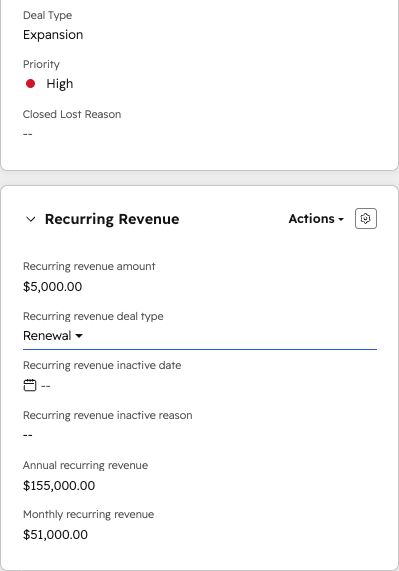
- When upgrading from $100K to $135K, enter $135K as the new deal amount, not $35K. HubSpot’s Revenue Analytics calculates the “Upgrade” contribution by comparing the new RR amount to the existing one. Entering just the delta breaks this calculation and understates your total ARR.
- Account admins can customize the default left sidebar for Sales or CS teams, so these recurring revenue properties are always pinned and visible on the deal record – no searching, no missed fields.
Designing Your Renewal Pipeline
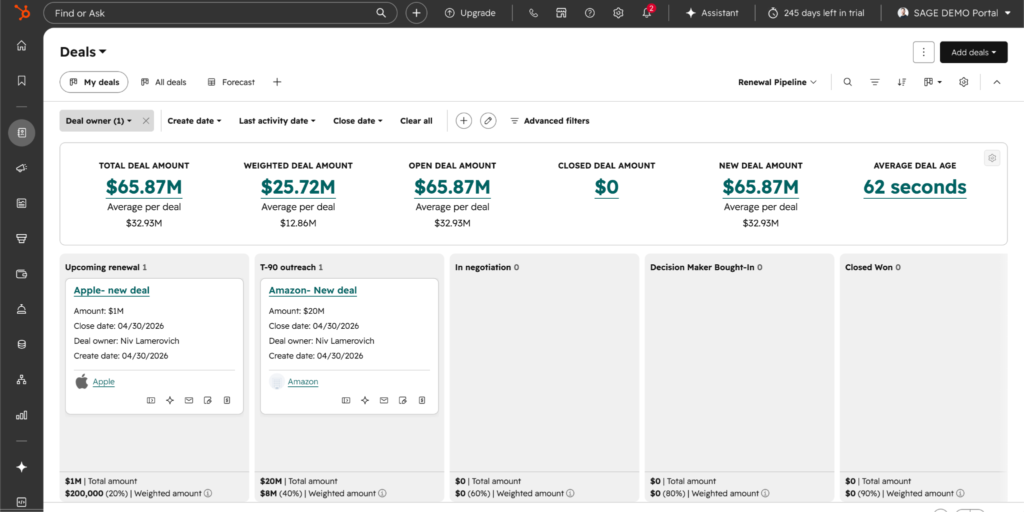
The most robust SaaS setup in HubSpot uses two separate deal pipelines: one for new business and one for renewals. This keeps metrics clean and gives your CS/Renewals team a dedicated workspace.
Recommended renewal pipeline stages
| Stage | Name | Purpose |
|---|---|---|
| 1 | Upcoming renewal | Auto-populated when new biz deal closes |
| 2 | T-90 outreach | Active CSM engagement begins |
| 3 | In negotiation | Pricing or scope discussions underway |
| 4 | Closed Won | Contract signed and renewed |
| 5 | Closed Lost | Customer churned or chose not to renew |
How the new-business-to-renewal handoff works
When a new business deal reaches Closed Won, a workflow should automatically:
- Create a new deal in the Renewal pipeline with the same amount, company association, and deal owner
- Set the deal name to “[Company], Year 2 Renewal”
- Set the Close Date to the contract end date (this drives your renewal forecast)
- Create a task assigned to the deal owner with a reminder 90 days before the close date
- Set the deal stage to “Upcoming renewal” (Stage 1)
SAGE expert tip, naming convention: Append a year marker to each renewal deal name (e.g., “Acme Corp, Year 3 Renewal”). This makes it trivially easy to see the full customer history, Year 1 → Year 2 → Year 3, in a single search without building a custom report. For expansion deals, create them separately (e.g., “Acme Corp, Seat Expansion Q2”) and associate both with the same company record.
Automating Renewals with Workflows
HubSpot Workflows are the engine that makes renewal management scalable. Here are the key automations every SaaS team should have in place.
Workflow 1: Auto-create renewal deal on Closed Won
Covered in Section 3. This is your foundational automation. Without it, every renewal deal must be created manually, which means it won’t happen consistently. Filter the workflow trigger by pipeline (New Business only) to avoid a loop where renewal deals also trigger it.
Workflow 2: Time-based stage progression
As renewal deals age and the close date approaches, automatically advance them through pipeline stages:
- T-180 days: Move to T-180 stage. Assign CSM. Flag for account health review.
- T-90 days: Move to T-90 outreach. Create a call task. Enroll in renewal email sequence.
- T-30 days: If deal is still in an early stage, send an escalation alert to the manager.
SAGE expert tip, use a calculated property, not date triggers: Instead of date-based workflow triggers (which break if the close date is updated), create a custom “Days to Renewal” calculated property: DATEDIFF(deal.closedate, TODAY()). Workflows filtered on Days to Renewal is less than 90 stay accurate even when a CSM updates the close date.
Workflow 3: RR inactive property automation
When a renewal deal closes, you need to update the original deal’s inactive date and reason. Doing this manually across hundreds of accounts doesn’t scale.
For Sales Hub Enterprise teams: use a custom-coded workflow action that looks up the associated original deal by company ID and contract end date, and updates the inactive properties automatically.
For smaller teams: use the Contracts custom object (see Section 5) as the single source of truth for contract dates. A workflow fires on contract end date and handles both the original deal update and new renewal deal creation in one place.
Leveraging Hubspot Native Payment and Subscription Properties
While many teams manage renewals using manual Deal properties, HubSpot’s Commerce Hub offers powerful automation through native Payment and Subscription objects. If you process payments via HubSpot Payments or the Stripe integration, HubSpot automatically synchronizes transaction data into these records.
For Professional and Enterprise users, these properties serve as high-accuracy triggers for workflows and reporting, moving your renewal engine from “manual entry” to “data-driven.”
Key Subscription Properties for SaaS Teams
Using these properties allows you to segment your customers and automate outreach based on actual financial data:
- Next Billing Date: The definitive date for the next invoice. Use this to trigger automated “Upcoming Renewal” reminders (e.g., 60 days before).
- Subscription Status: Automatically tracks if a subscription is Active, Past Due, Unpaid, Canceled, or Expired. Set up internal “Red Flag” notifications the moment a status changes to Past Due.
- Annual & Monthly Recurring Revenue (ARR/MRR): Native fields that calculate revenue in your company currency, providing real-time reporting on account growth or contraction without manual math.
- Total Remaining Amount: For fixed-term contracts, this tells you exactly how much “runway” is left in the current agreement, which is essential for forecasting.
- Last Modification Reason: This property tracks why a subscription changed (e.g., a seat upgrade or a downgrade). Reviewing this during your 90-day Health Check provides vital context on account momentum.
- Number of Expected Payments: Useful for calculating the total remaining contract value (LTV) and identifying accounts nearing the end of their lifecycle.
Professional Workflow Tip: Self-Service Renewals
HubSpot provides a unique, auto-generated Update Payment Method Link for every subscription. To reduce administrative friction during the renewal phase, include this link in your 30-day automated reminder emails. This allows customers to verify or update their billing information self-service, preventing “accidental churn” due to expired credit cards.
By leaning on these native properties, you ensure that your renewal process is integrated with actual cash flow, providing a more professional experience for the customer and a more accurate reporting suite for your leadership.
Handling Expansions & Contractions
SaaS ARR management gets complex when you have separate renewal and expansion motions happening simultaneously on the same account. HubSpot doesn’t handle this scenario out-of-the-box, but there are two solid patterns.
Pattern A: Contracts custom object (recommended)
Create a Contracts custom object that serves as the account-level container. Each Contract record is associated with all relevant deals (renewal + expansion). The contract record holds:
- Contract end date, drives the renewal workflow trigger
- Total contract value, a calculated property summing all associated deal amounts
- Contract status, Active, Renewing, Churned
Here’s what a Contract record looks like in HubSpot, showing the revenue overview, billing details, and renewal information all in one place:

Source: HubSpot Knowledge Base — Understand contracts in HubSpot
SAGE expert tip, solving the expansion + renewal summation problem: For the scenario where you have a $100K renewal deal and a $35K expansion deal both closing simultaneously, and you need the next renewal to reflect $135K: the Contracts object solves this neatly. Use a calculated property on the Contract that sums the amounts of all associated Closed Won deals. When the contract end date arrives, a workflow reads this total and creates the new renewal deal with the correct combined amount. No custom code required.
Pattern B: Custom-coded workflow action
Without the Contracts object, use HubSpot’s custom-coded action in workflows:
- Trigger: Any deal with a matching contract end date reaches Closed Won
- Custom code: Search for all deals on the same company with the same close date via the HubSpot API, filtered to Closed Won status
- Sum the amounts and create the next renewal deal with amount = sum of all matched deals, close date = contract end date + contract term length
Upgrade vs. Expansion: what’s the difference in HubSpot?
| Motion | RR deal type | What to do | New deal? |
| Renewal (same amount) | Renewal | Close original as “Renewal inactive”, create new deal | Yes |
| Expansion (more seats/features) | Upgrade | Close original as “Renewal inactive”, create a new deal | Yes |
| Partial downgrade | Downgrade | Close original as “Downgrade inactive”, create new deal at lower amount | Yes |
| Full churn | — | Set inactive date + reason = Churned. No new deal. | No |
SaaS Pipeline Structure for Trial Users
For SaaS companies with self-serve or trial motions, creating a deal for every trial user will pollute your pipeline and make your metrics meaningless.
The recommended approach: lifecycle stages, not deals
Keep trial users as Contacts and manage them via Lifecycle Stage (Lead → MQL → SQL → Customer). Only open a deal record when a contact shows genuine buying intent, typically by requesting a demo, talking to sales, or hitting a defined product usage threshold.
| User type | HubSpot object | Pipeline | Lifecycle stage |
|---|---|---|---|
| Free / trial (no intent) | Contact | None | Lead → MQL |
| Trial with demo request | Contact + Lead | New Business | SQL |
| Paid customer | Contact + Deal (Closed Won) | Renewal | Customer |
| Upsell opportunity | New deal | New Business or Expansion | Customer |
SAGE expert tip, three-pipeline architecture for mature SaaS:
At scale, the cleanest architecture is three pipelines:
1. New Business: All net-new logos. Owned by AEs.
2. Renewal: All existing contract renewals. Owned by CSMs.
3. Expansion: All upsell/cross-sell to existing customers. Owned by AEs or CSMs depending on your motion.
Each pipeline has distinct stages, probability settings, and forecast categories. This separation makes your board-level ARR waterfall dramatically more accurate.
Alternative Method: Reporting MRR Directly from Line Items
Another effective method for capturing Monthly Recurring Revenue (MRR) within HubSpot is leveraging Line Item Revenue Reporting. This approach automates revenue distribution by tying data directly to the individual line items within a deal.
How It Works
Instead of relying on manually maintained MRR fields, HubSpot can use the properties of recurring line items attached to a deal, such as price and term length, to calculate recurring revenue over time.
For example:
- A deal includes a recurring line item
- The contract runs for 12 months
- The monthly price is $1,000
In this case, the system can represent $1,000 of MRR for each month across the full contract duration.
This provides a more structured, time-based view of revenue compared to static deal properties.
Handling Expansions and Overlapping Revenue
This approach becomes especially useful when managing expansions, upsells, or overlapping contracts.
For example:
- A customer has an active $1,000/month subscription
- They later add an expansion of $1,000/month for two months
The reporting dynamically reflects this change:
- MRR increases to $2,000 during the overlap period
- Then returns to $1,000 once the expansion ends
This creates a more accurate month-by-month view of how revenue actually behaves over time.
Why This Matters for SaaS Teams
This shift helps close a major gap in native CRM reporting by aligning revenue tracking more closely with how SaaS businesses operate.
Key benefits include:
- More accurate recurring revenue visualization
- Reduced reliance on manual MRR tracking fields
- Less dependence on spreadsheets or external reporting tools
- Improved visibility into expansions, contractions, and renewals
For teams managing subscription-based revenue, line item–driven reporting offers a more scalable and consistent way to understand MRR trends directly within HubSpot, without heavy customization.
Revenue Analytics & Reporting
Once your properties are filled in correctly and your deals are in the right stages, HubSpot’s Revenue Analytics report gives you an ARR waterfall broken down by: New Business, Renewals, Upgrades, Downgrades, and Churn.
How to access it
Reporting → Reports → Sales → Sales outcomes → Revenue
Use the Date Range and Frequency dropdowns to filter by month, quarter, or year. Each column in the report maps directly to a Recurring revenue deal type value.
Key reports to build on top of this data
Net Revenue Retention (NRR) Formula: (Starting ARR + Upgrades − Downgrades − Churn) ÷ Starting ARR × 100. Build as a custom report using recurring revenue properties filtered by month.
Renewal forecast by owner Deals in the Renewal pipeline by deal owner, filtered to close within the next 90 days. A must-have for weekly CS team reviews.
Churn risk dashboard Renewal deals still in early pipeline stages with close date less than 30 days away. These are your fire-drill accounts.
Cohort ARR expansion Group Closed Won new business deals by close month, then track upgrades and downgrades for those same companies over time. This is how you measure product-led expansion.
SAGE expert tip, RR Amount is monthly, ARR reports multiply by 12: HubSpot’s Revenue Analytics displays monthly figures in all columns. When you see “$15,000” in the Renewals column, that’s $15K MRR, representing $180K ARR. To surface ARR directly, create a custom deal property ARR = RR Amount × 12 using a calculated property formula and use that in custom reports instead of the native RR Amount field.
Building Reliable SaaS Revenue Reporting in HubSpot
HubSpot gives SaaS teams a strong foundation for managing recurring revenue, renewals, expansions, downgrades, and churn, but the quality of the reporting depends heavily on the underlying structure.
This becomes especially important when leadership wants to measure SaaS metrics such as ARR, NRR, GRR, churn, downgrade revenue, and expansion revenue.
These metrics are not just deal amounts. They are revenue movements over time.
That means the way you structure deals, renewal pipelines, recurring revenue properties, contract dates, and expansion motions in HubSpot will directly affect the accuracy of your reports.
For many SaaS teams, this is where things get complicated.
They may use HubSpot successfully for pipeline management, sales activity, and customer communication, but still rely on spreadsheets to understand what is happening with recurring revenue.
The goal is not to replace every financial model overnight.
The goal is to make HubSpot structured enough to become the operational source of truth for recurring revenue motions, so Sales, CS, RevOps, Finance, and leadership can all work from the same clean foundation.
Why SaaS Revenue Reporting Requires Structure
SaaS revenue reporting is different from standard deal reporting.
In a regular sales pipeline, a deal is often treated as a one-time commercial event. The deal is created, moved through the pipeline, closed won or lost, and then reported as revenue.
But recurring revenue does not work that way.
A SaaS customer relationship changes over time. A customer may start with one subscription, renew a year later, add more seats, remove a product, downgrade a package, expand mid-contract, or eventually churn.
Each of those changes affects ARR, MRR, GRR, NRR, churn, and expansion reporting.
That is why SaaS revenue reporting in HubSpot should be designed around revenue movements, not just closed-won deals.
The key question is not only:
“How much did we sell?”
The better question is:
“What happened to recurring revenue over time?”
To answer that properly, HubSpot needs a consistent structure for tracking:
- New recurring revenue
- Renewed recurring revenue
- Expansion revenue
- Downgrade / contraction revenue
- Churned revenue
- Current ARR / MRR
- Previous ARR / MRR
- Contract start and end dates
- Renewal timing
- Revenue ownership
Without this structure, reports can quickly become confusing.
A company might technically have all the data inside HubSpot, but if the data is stored inconsistently, leadership will still end up going back to spreadsheets to understand what actually happened.
The Core Principle: Do Not Overwrite Revenue History
One of the most important best practices in HubSpot SaaS revenue management is to avoid treating one deal as the full customer history.
If a customer starts at $100K ARR, renews at $100K, and later expands to $135K, the original deal should not simply be edited from $100K to $135K.
That destroys the historical revenue story.
Instead, each meaningful revenue movement should be represented as a separate revenue event.
This gives you a cleaner way to understand:
- What was sold originally
- What was retained
- What expanded
- What contracted
- What churned
- What should become the new renewal baseline
The principle is simple:
Do not overwrite history. Create a new revenue event.
This is especially important for SaaS companies that care about GRR and NRR.
If you simply edit the original deal amount every time a customer changes their contract, you lose the ability to accurately report what was renewed, what expanded, what downgraded, and what churned.
HubSpot becomes much more powerful when it reflects the real commercial journey of the customer over time.
Recommended Revenue Motion Structure
The best-practice setup is to represent each major revenue motion clearly in HubSpot.
| Revenue motion | How to manage it in HubSpot |
| New customer | Create a New Business deal |
| Standard renewal | Create a Renewal deal |
| Expansion / upsell | Create an Upgrade or Expansion deal |
| Partial downgrade | Create a Downgrade revenue event |
| Full churn | Mark the original recurring revenue as inactive / churned |
| Multi-year contract | Track contract start date and contract end date |
| Complex account with multiple products | Use Line Items, Subscriptions, or a Contracts custom object |
This structure helps HubSpot tell the full revenue story of the customer.
For example, if a customer signs a $100K ARR contract, then renews at $100K, and then expands by another $35K, the system should not only show a customer with $135K ARR.
It should show:
- The original $100K new business deal
- The renewal event
- The $35K expansion or upgrade motion
- The updated renewal baseline for the next period
This separation allows you to report on retained revenue, expansion revenue, contraction revenue, churned revenue, and new ARR more accurately.
Without this separation, GRR and NRR reporting becomes much less reliable.
How to Think About GRR and NRR in HubSpot
GRR and NRR should not be built from total closed-won revenue.
They should be built from recurring revenue movements across an existing customer base.
That means you need to separate new revenue from existing customer revenue.
New Business is important, but it should not be mixed into GRR or NRR calculations.
GRR and NRR are about what happened to the revenue you already had.
GRR: Gross Revenue Retention
GRR measures how much recurring revenue you retained from existing customers, excluding expansion.
Formula:
GRR = (Starting ARR – Churn – Downgrades) / Starting ARR × 100
Use GRR to understand how well you retain existing revenue before upsells hide the problem.
For example, if you started the year with $1M ARR, lost $100K to churn, and had $50K in downgrades:
GRR = ($1M – $100K – $50K) / $1M × 100 = 85%
GRR is useful because it shows the health of your existing customer base without expansion revenue making the number look better than it really is.
A company can have strong expansion and still have a retention problem.
GRR helps reveal that.
NRR / NDR: Net Revenue Retention
NRR, also called NDR, measures retained revenue after including expansion.
Formula:
NRR = (Starting ARR + Expansion – Downgrades – Churn) / Starting ARR × 100
Use NRR to understand whether your existing customer base is growing or shrinking overall.
For example, if you started with $1M ARR, added $200K in expansion, lost $100K to churn, and had $50K in downgrades:
NRR = ($1M + $200K – $50K – $100K) / $1M × 100 = 105%
NRR is one of the most important SaaS metrics because it shows whether your existing customers are expanding enough to offset churn and contraction.
This is why separating upgrades, downgrades, churn, and renewals correctly in HubSpot matters so much.
If everything is simply reported as “Closed Won,” you cannot calculate this properly.
The Recommended HubSpot Setup
For most B2B SaaS companies, the cleanest setup is built around six foundations.
1. Separate pipelines
Use separate pipelines for different revenue motions.
A common structure is:
- New Business
- Renewals
- Expansion / Upsell
This keeps sales forecasting, CS renewal management, and expansion reporting cleaner.
New Business deals represent new logos.
Renewal deals represent the continuation of existing recurring revenue.
Expansion deals represent additional revenue from existing customers.
Mixing all three motions in one pipeline usually creates confusion for reporting, ownership, forecasting, and board-level ARR visibility.
Separate pipelines also help each team work in the right context.
AEs can focus on new logos.
CSMs can focus on upcoming renewals.
Account managers or commercial owners can focus on expansion opportunities.
2. Clear revenue motion values
Every recurring revenue deal should have a clear revenue motion.
Recommended values include:
- New Business
- Renewal
- Upgrade / Expansion
- Downgrade
- Churn
Do not rely only on the pipeline name.
Use dedicated properties as well.
This gives you cleaner segmentation for custom reports and makes it easier to understand what actually happened to revenue in a specific period.
For example, an expansion deal may live in an Expansion pipeline, but the revenue motion property should still clearly indicate that this is expansion revenue.
The same applies to downgrade and churn events.
The cleaner the classification, the easier it becomes to build reliable ARR, NRR, GRR, churn, and downgrade reports.
3. Contract start and end dates
Every customer contract should have clear date fields.
At minimum, track:
- Contract start date
- Contract end date
- Renewal date
- Current ARR / MRR
- Previous ARR / MRR
- Revenue movement type
These fields are critical because recurring revenue is time-based.
Without accurate dates, HubSpot may still show deal revenue, but it will be difficult to understand when revenue started, when it ended, what renewed, and what changed.
The contract end date is especially important for renewal management.
It should drive renewal deal close dates, CSM reminders, T-90 outreach tasks, renewal forecast reports, and escalation workflows.
4. Enter the full new contract value, not only the delta
For upgrades and downgrades, teams often make the mistake of entering only the delta.
For example, if a customer grows from $100K ARR to $135K ARR, the expansion is $35K, but the new recurring revenue baseline is $135K.
Depending on the reporting model you choose, you may want to track the $35K as the expansion amount while also making sure the new contract baseline reflects the full $135K.
This distinction matters.
The expansion amount tells you how much revenue was added.
The new contract value tells you what should renew in the next period.
If you only track the delta and never update the renewal baseline, the next renewal forecast may be wrong.
Best practice is to make sure HubSpot can answer both questions:
- How much did the customer expand or contract?
- What is the customer’s new recurring revenue baseline?
5. Never edit the original deal to represent the new reality
This is one of the biggest mistakes SaaS teams make in HubSpot.
If a customer downgrades from $100K ARR to $70K ARR, do not simply edit the original deal amount to $70K.
That destroys the historical context.
Instead, preserve the original revenue history and create or track the downgrade as a separate revenue movement.
The same logic applies to upgrades, renewals, and churn.
You need to know what the customer started with, what changed, when it changed, and why it changed.
This gives your RevOps, CS, Finance, and leadership teams a more accurate view of the customer journey and revenue performance.
6. Use a Contracts object when deals are not enough
For simple SaaS businesses, deal records may be enough.
But once customers can have multiple products, multiple subscriptions, different renewal dates, mid-contract expansions, partial downgrades, or complex billing terms, deals alone often become too limited.
In that case, a Contracts custom object can become the account-level source of truth.
A Contract record can hold:
- Current contract value
- Contract start date
- Contract end date
- Renewal date
- Contract status
- Associated renewal deals
- Associated expansion deals
- Associated downgrade events
- Total active ARR
This gives you a cleaner layer between the CRM sales process and the financial revenue logic.
Instead of trying to force every SaaS revenue scenario into one deal record, the Contract becomes the container that connects all related revenue events.
This is especially useful when one company has multiple products, several contract lines, or expansions that happen during the contract period.
Where HubSpot Fits in the SaaS Revenue Stack
For many SaaS companies, the strongest setup is not HubSpot instead of every other system.
It is HubSpot as the operational source of truth for the customer revenue process.
HubSpot should manage the commercial motion:
- Sales pipeline
- Renewal pipeline
- Expansion opportunities
- Customer ownership
- CSM tasks
- Renewal reminders
- Churn risk workflows
- Commercial history
- Customer communication
Billing or ERP systems should manage the financial truth:
- Invoices
- Payments
- Subscription status
- Billing events
- Recognized revenue
- Collections
- Tax and accounting logic
BI tools or spreadsheets can still be used for board-level analysis, cohort reporting, and financial reconciliation.
The goal is not always to eliminate spreadsheets completely.
The goal is to make sure spreadsheets are used for analysis, not because HubSpot lacks structure.
A realistic architecture often looks like this:
| System | Role |
| HubSpot | Customer process, renewals, CS tasks, pipeline, ownership, commercial motion |
| Billing / ERP | Invoices, payments, subscription status, billing events, recognized revenue |
| BI / Spreadsheet | Board-level revenue reporting, reconciliation, SaaS metrics, cohort analysis |
In this model, HubSpot manages the process and the revenue motions.
Billing or ERP systems manage financial truth.
BI or spreadsheets can still be used for board-level analysis and reconciliation, but they are no longer the only place where the recurring revenue logic exists.
When HubSpot Is Enough, and When to Connect Other Systems
HubSpot can work very well for SaaS revenue management when the structure is relatively clean.
HubSpot is often enough when:
- Your SaaS contracts are relatively simple
- Renewals happen annually
- Each customer has one main contract
- Expansions and downgrades are not too frequent
- Sales and CS follow a consistent process
- Recurring revenue properties are maintained correctly
- Your team agrees on one revenue architecture
HubSpot becomes even stronger when workflows, reporting, deal properties, line items, subscriptions, and contract-level data are configured properly.
However, more complex SaaS companies may need to connect HubSpot with other systems.
This is usually the case when:
- Customers have multiple subscriptions
- Billing data lives in Stripe, Chargebee, NetSuite, Priority, QuickBooks, or another system
- You need finance-grade NRR and GRR
- You need cohort-based ARR analysis
- You operate in multiple currencies
- You need to reconcile CRM revenue with invoices, payments, and collections
- You need board-level revenue reporting
In these cases, HubSpot should still play a central role.
It should be the operational CRM layer that manages the customer-facing revenue process.
The billing, ERP, or BI system can then support the financial reporting layer.
This approach gives teams the best of both worlds:
HubSpot for process, ownership, automation, and visibility.
Finance systems for billing, payment, and accounting accuracy.
BI or spreadsheets for advanced analysis and executive reporting.
Practical Reporting Views to Build in HubSpot
Once the structure is in place, SaaS teams should build a set of core reports and dashboards.
Recommended reports include:
- New ARR by month or quarter
- Renewal ARR by renewal date
- Expansion ARR by customer segment
- Downgrade ARR by reason
- Churned ARR by churn reason
- Renewal forecast for the next 30, 60, and 90 days
- At-risk renewals by CSM
- ARR by customer owner
- ARR by product or plan
- NRR and GRR trend by period
- Expansion pipeline from existing customers
- Customers with a renewal date approaching and no activity logged
These reports help turn HubSpot from a CRM database into an operating system for SaaS revenue management.
The more consistent the data model, the more reliable these dashboards become.
Best-Practice Summary
To build reliable SaaS revenue reporting in HubSpot, follow these principles:
- Separate new business, renewals, and expansions
- Track every meaningful revenue movement as its own event
- Keep original revenue history intact
- Use recurring revenue properties consistently
- Track contract start dates and contract end dates
- Make sure the new renewal baseline is always clear
- Use the full contract value where required, not only the delta
- Add a Contracts object when the deal records are not enough
- Connect billing or ERP data when financial accuracy matters
- Build custom reports for ARR, GRR, NRR, churn, downgrades, and expansion visibility
The real value of HubSpot is not only in storing deal data.
The value is in creating a shared revenue operating system for Sales, CS, RevOps, Finance, and leadership.
When HubSpot is structured correctly, teams can stop relying on scattered spreadsheets and start managing recurring revenue with a cleaner, more scalable process.
Bottom Line
HubSpot does not become a reliable SaaS revenue management system just because Revenue Analytics is turned on.
The real value comes from designing the right SaaS revenue architecture.
That means defining how revenue movements should be tracked, how renewals should be created, how expansions and downgrades should be handled, and how contract data should flow through the system.
Once this structure is in place, HubSpot becomes much more useful.
Not because it magically replaces every spreadsheet or finance tool, but because it gives Sales, CS, RevOps, Finance, and leadership one structured operating system for managing recurring revenue.
That is the real best practice.
Setup Checklist & Quick Reference
Use this checklist before going live with your SaaS renewal and recurring revenue setup in HubSpot.
Core HubSpot Revenue Analytics Setup
- Activated the 4 recurring revenue deal properties via Revenue Analytics
- Confirmed that the Revenue Analytics tool is available in your HubSpot subscription
- Entering Recurring revenue amount as a monthly value, not an annual value
- Deal Close Date is set to the actual contract start date, not only the internal won date
- Only Closed Won deals feed into the Revenue Analytics report
- Adjusted the left-hand side Deal sections so recurring revenue fields are easy for Sales and CS teams to update
- Adjusted Deal board views to show the most important renewal, contract, and revenue fields
- Confirmed that Sales, CS, RevOps, and Finance understand how each recurring revenue property should be used
Renewal Pipeline Setup
- Created a dedicated Renewal pipeline with clear stages, including Closed Won and Closed Lost
- Added renewal stages such as Upcoming Renewal, T-90 Outreach, In Negotiation, Closed Won, and Closed Lost
- Built a Closed Won workflow to automatically create renewal deals
- Renewal deal Close Date is set to the contract end date
- Created a T-90 task or reminder for the CSM / renewal owner
- Added T-60 or T-30 reminders where relevant
- Renewal ownership is clearly assigned to the right team member, usually the CSM or account owner
- Renewal deals are reviewed regularly in CS or revenue meetings
Revenue Motion Setup
- New Business, Renewal, Expansion, Downgrade, and Churn are clearly separated
- Every recurring revenue deal has a clear revenue motion value
- New Business deals are not mixed with Renewals in reporting
- Expansion / Upgrade deals are clearly separated from standard renewals
- Downgrades are tracked as a distinct revenue movement
- Full churn is marked with the right inactive date and inactive reason
- Original revenue history is preserved and not overwritten
- The team knows when to create a new deal versus when to update an existing record
Recurring Revenue Data Entry
- RR amount is entered as a monthly value — annual value divided by 12
- Inactive date and inactive reason are set on the original deal before creating the renewal deal
- Full new contract value is entered for upgrades and downgrades, not only the delta
- The new renewal baseline is clear after every upgrade, downgrade, or expansion
- Contract start date and contract end date are tracked consistently
- Current ARR / MRR and previous ARR / MRR are tracked where needed
- Revenue movement type is captured consistently across all relevant deals
- Required revenue fields are completed before deals can move to Closed Won
ARR, NRR, and GRR Reporting Setup
- Starting ARR is clearly defined
- New Business ARR is tracked separately
- Renewal ARR is tracked separately
- Expansion revenue is tracked separately
- Downgrade/contraction revenue is tracked separately
- Churned ARR is tracked separately
- GRR is calculated without including expansion
- NRR / NDR is calculated with expansion included
- New Business ARR is excluded from GRR and NRR calculations
- Reports can distinguish between retained revenue, expansion revenue, contraction revenue, and churned revenue
- Leadership has a clear view of ARR movements by month, quarter, or year
Contracts, Line Items, and Complex Revenue Models
- Using the Contracts custom object for multi-deal expansions where relevant
- A Contracts custom object is used when customers have multiple products, subscriptions, renewal dates, or complex billing terms
- Line items are used when product-level revenue detail is important
- Subscription or billing data is synced into HubSpot when relevant
- The team can answer both questions: “How much did revenue change?” and “What is the new recurring revenue baseline?”
- Trial users are kept as Contacts until they show genuine buying intent
- Deals are only created when there is a real commercial opportunity
- Complex account structures are not forced into one deal record when a Contracts object or subscription structure would be cleaner
Automation and Governance
- Renewal deal creation is automated where possible
- CSM tasks and reminders are created automatically
- At-risk renewals are flagged before the renewal date
- Managers receive alerts for late-stage or overdue renewals
- Required fields are enforced before deals can move to Closed Won
- Sales, CS, RevOps, and Finance agree on the same revenue definitions
- A documented process exists for handling renewals, upgrades, downgrades, churn, and expansions
- The team has a clear owner for maintaining revenue data quality in HubSpot
Reporting and Dashboards
- New ARR report
- Renewal ARR report
- Expansion ARR report
- Downgrade ARR report
- Churned ARR report
- Renewal forecast for the next 30, 60, and 90 days
- At-risk renewals dashboard
- ARR by owner, segment, product, or plan
- NRR and GRR trend reports
- Customers with upcoming renewal dates and no recent activity
- Renewal pipeline by CSM or account owner
- Churn and downgrade reasons dashboard
- Expansion opportunities from existing customers dashboard
Final Go-Live Check
Before going live, confirm that your team can answer these questions directly from HubSpot:
- Which customers are renewing in the next 90 days?
- What ARR is at risk?
- Which customers expanded this period?
- Which customers downgraded?
- Which customers churned?
- What is our current ARR baseline?
- What is our GRR?
- What is our NRR / NDR?
- Which renewal deals need immediate attention?
- Which customers require CS or management escalation?
- Which customers have no renewal activity despite an upcoming contract end date?
- Which revenue changes need Finance review or reconciliation?
If the answer to these questions still lives only in a spreadsheet, the HubSpot revenue architecture is not finished yet.
The goal is not to remove every spreadsheet from the business.
The goal is to make HubSpot structured enough that spreadsheets are used for analysis and reconciliation — not because the recurring revenue process itself is unclear.
FAQ
Should renewals live in a separate pipeline or together with New Business?
Renewals should usually live in a separate pipeline. New Business and Renewals are different revenue motions, with different owners, stages, risks, and reporting needs. Keeping them separate helps you measure GRR, NRR, churn, renewal rate, and expansion more accurately. A clean structure is usually: New Business for AEs, Renewals for CSMs, and Expansion for upsells or cross-sells.
When should we open a renewal deal, at the moment of close, or 90 days before expiry?
Create the renewal deal when the original deal closes, not only 90 days before expiry. This gives leadership and CS full visibility into future renewals from day one. The deal can stay in an “Upcoming Renewal” stage until action is needed. A workflow can create the renewal deal automatically with the right amount, company association, owner, and contract end date.
Can we automatically copy product line items to the renewal deal?
Not fully with standard HubSpot workflows. HubSpot does not natively copy line items from one deal to another through regular workflow actions. You can handle this with a custom-coded workflow action, Data Hub Enterprise, Zapier, Make, or a manual CSM process. Either way, pricing, quantities, contract dates, and product changes should always be reviewed before the renewal is finalized.
How do we accurately track ARR, MRR, and churn in HubSpot?
HubSpot has more than one way to track recurring revenue, so it is important not to mix them. Native ARR and MRR properties are useful at the deal level, while Enterprise recurring revenue properties power HubSpot’s Revenue Analytics reports. Enterprise teams should use workflows to populate recurring revenue fields. Professional teams can still build useful ARR and churn reports using custom deal reporting.
Can Revenue Analytics handle multi-currency companies?
Yes. Revenue Analytics can support multi-currency companies, but the Recurring revenue amount should be entered consistently in your company’s primary currency. HubSpot can auto-convert amounts for reporting when multi-currency is enabled, but mixing currencies at the RR Amount level can create reporting confusion. Best practice: define one standard currency, document it clearly, and make sure sales/admin teams follow it consistently.
Who should own renewals, the CSM or the AE?
In most B2B SaaS companies, the CSM should own the renewal because they manage the customer relationship, understand product usage, and know whether value has been delivered. The AE can own expansion, upsell, or new commercial opportunities. In HubSpot, workflows can assign renewal deals to the company’s assigned CSM instead of automatically keeping the original AE as the deal owner.
How do we handle contracts that expire on different dates throughout the year?
Use the contract end date as the renewal deal’s close date. This keeps the renewal pipeline organized by actual renewal timing and helps CS teams see what is coming in the next 30, 60, or 90 days. Add a dedicated Contract End Date property and use it to trigger renewal reminders, CSM tasks, workflows, and monthly renewal forecasting reports.
A customer signed for $100K but the renewal will be $135K. How do we handle this?
The cleanest approach is to separate the $100K renewal from the $35K expansion. This helps you clearly measure what was retained versus what was grown, which is essential for GRR and NRR reporting. For Enterprise teams, a Contracts object can also connect renewal and expansion deals under one contract view while keeping the underlying revenue reporting clean and accurate.
We set up our pipeline wrong from day one. How do we clean it up without breaking reports?
Do not try to fix everything retroactively at once. Start with a forward-only cleanup from a clear “day zero,” then apply the new process to all future deals. Add a Deal Type property to tag historical records and improve filtering. If you use Enterprise recurring revenue properties, backfill key fields in controlled CSV batches after completing a proper data audit.
We use Stripe / Chargebee for billing. Do we need to duplicate everything in HubSpot?
No. Stripe or Chargebee should remain the source of truth for billing, invoices, payments, and subscription status. HubSpot should manage the customer relationship, renewal process, tasks, health scores, and CS communication. Sync key billing data into HubSpot as company or subscription properties, but avoid recreating your entire billing system inside the CRM.